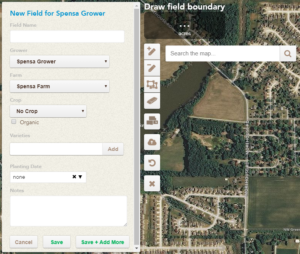
Field Information Tools
| Field | Description |
|---|---|
| Farm | DTN AP organizes field information with an:
|
| Crop | The crop for the currently selected field |
| Hybrids/Varieties | A free-form field that allows you to record which hybrids and varieties are associated with this field. |
| Planting Date | The planting date for the field. This date will be used to calculate growth stage if applicable. |
| Notes | General notes for the field |
| Delete | Remove the current field and all of its associated data (scouting trips, traps, field records, etc.) from the current select season |
| Cancel | Cancel any pending changes to this field |
| Save | Save pending changes to this field |
GIS Tools
 |
Add to boundary | Create another shape, adding it to the existing boundary |
 |
Cut out from boundary | Create another shape, removing it from the existing boundary |
 |
Edit boundary outlines | Drag points of the current boundary to create new shapes |
 |
Remove pieces | Remove shapes from the current boundary |
 |
Toggle CLU outlines | Utilize Common Land Units to create a field boundary |
 |
Upload a shapefile | Upload a shapefile to overwrite the current field boundary shapes |
 |
Undo | Undo your last action |
 |
Start Over | Clear all existing field boundaries |