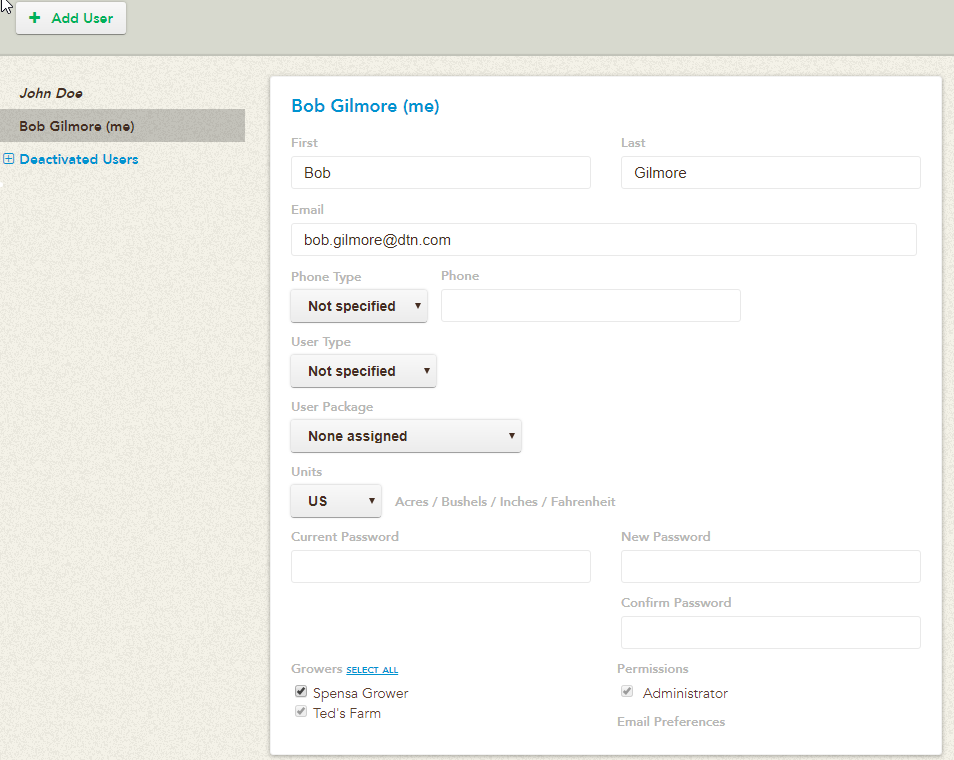
Account Info
| First name | First name of the user | |
| Last name | Last name of the user | |
| This is the account’s username as well | ||
| Phone type | The type of phone number entered for this account.
|
|
| User Type | This drop-down allows you to choose what type of User Account this is in your system.
|
|
| User Package | This drop-down allows you to choose what user package you want to grant to the selected user. You have five options:
|
User Type
Access Level
This drop-down allows you to choose what access level you want to grant to the selected user. You have three options:
| Full | View and change data and settings for growers assigned below |
| Basic | Scouting & trapping for growers assigned below
Android scouting doesn’t support Basic — will act as Read Only |
| Read-only | View growers assigned below, but not make changes. Commonly referred to as a Grower account. Users with Read Only cannot modify any information in the system, but can interact with all of its functionality. |
Growers
This list contains all of the Growers under your account. You can give a user access to specific Growers here by checking off which ones you want them to have access to.
When all of your changes are complete, click Save.
Permissions
| Administrator Rights | Super user for the account. Someone with Administrator Rights can create new accounts, see all Growers, and update all information. |