Some of our users have reported issues using the default camera app found on their device. One solution is to install OpenCamera from your device’s app store and utilize it during scouting trips.
When taking a picture within the DTN AP app, you will be prompted to select a camera app:
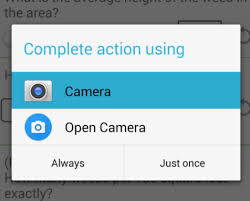
If you would like to always have OpenCamera as your default choice, select it on the screen and choose the Always option.